Saturday, December 28, 2024

Repurpose Ghostty Terminal shortcut for vim or neovim ( osx macos sonoma )

I want pointing my
cmd+h to C+w+h
cmd+l to C+w+l
First change Keyboard setting ( on OSX sonoma ) ,
settings -> keyboard -> keyboard shortcuts -> app shortcuts
and add
Hide Ghostty 
see setting below:
add config to ~/.config/ghostty/ghostty
macos-option-as-alt = true
keybind = cmd+l=text:\x17\x6C
keybind = cmd+h=text:\x17\x68
close and reopen ghostty or reload config.

as my comments on ghostty

Thursday, January 25, 2024

Restore old Right-click Context menu in Windows 11

Restore old Right-click Context menu in Windows 11

Restore the old Context Menu in Windows 11 

Right-click the Start button and choose Windows Terminal.

Copy the command from below, paste it into Windows Terminal Window, and press enter.

reg.exe add "HKCU\Software\Classes\CLSID\{86ca1aa0-34aa-4e8b-a509-50c905bae2a2}\InprocServer32" /f /ve

Restart File Explorer or your computer for the changes to take effect.


You would see the Legacy Right Click Context menu by default.

Restore Modern Context menus in Windows 11 

To undo this change, in a Terminal Window, execute this command:

reg.exe delete "HKCU\Software\Classes\CLSID\{86ca1aa0-34aa-4e8b-a509-50c905bae2a2}" /f
Restart the File Explorer or Computer for the changes to take effect.

Thursday, January 11, 2024

Install Qt Designer Standalone for pyqt5 python


Via command line

pip install pyqt5-tools

then run it
pyqt5-tools designer

usually its on for pyqt5-tools :
C:\python310\Scripts\pyqt5-tools.exe

and designer on this
C:\PYTHON_INSTALATION\Lib\site-packages\pyqt5_tools\Qt\bin

or
C:\PYTHON_INSTALATION\Lib\site-packages\qt5_applications\Qt\bin

Thursday, August 31, 2023

Add Command Prompt to the Context menu Windows 10, 11

Add Command Prompt to the Context menu


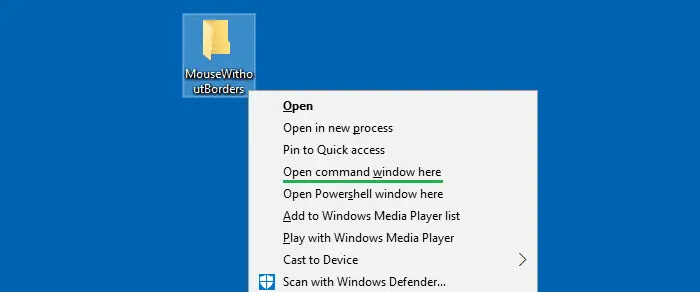
If you’re fond of the old Command Prompt (cmd.exe), you can add the traditional “Open Command window here” option back in the context menu for file system folders and drives, using a Registry edit.

Method 1

This method creates a new menu item named “Open command window here” by adding the necessary context menu registry entries.

  1. Open Notepad.
  2. Copy the following lines and paste them in Notepad:
    Windows Registry Editor Version 5.00
    
    [HKEY_CLASSES_ROOT\Directory\shell\cmdprompt]
    @="@shell32.dll,-8506"
    "NoWorkingDirectory"=""
    
    [HKEY_CLASSES_ROOT\Directory\shell\cmdprompt\command]
    @="cmd.exe /s /k pushd \"%V\""
    
    [HKEY_CLASSES_ROOT\Directory\Background\shell\cmdprompt]
    @="@shell32.dll,-8506"
    "NoWorkingDirectory"=""
    
    [HKEY_CLASSES_ROOT\Directory\Background\shell\cmdprompt\command]
    @="cmd.exe /s /k pushd \"%V\""
    
    [HKEY_CLASSES_ROOT\Drive\shell\cmdprompt]
    @="@shell32.dll,-8506"
    "NoWorkingDirectory"=""
    
    [HKEY_CLASSES_ROOT\Drive\shell\cmdprompt\command]
    @="cmd.exe /s /k pushd \"%V\""
    
  3. Save the file as “cmdhere.reg
  4. Double-click the file to apply the settings to the registry.

Alternately, you can download the following registry file:


Wednesday, November 11, 2020

Kenapa ngerubah nilai golang ( gui ) itu lama?

dapet chat dari C# junior developer.
"Bang, kenapa cuma nambahin fungsi Limiter(INTEGER) kenapa 2 jam sih?"

Okay sebagai programmer c#, aku tahu kok ngasih limiter itu tinggal drag and drop numericupdown lalu bind dengan app data (automatic ), and youre done ( 5 menit paling lama)

Oke, tak breakdown satu persatu di golang.

Konsepnya adalah CLIENT ngerubah nilai limiter ( di program ), dan otomatis ke save dan berubah tiap program di eksekusi.

Di golang.
GUI:
di golang kamu bikin dulu gui nya, aku gunain lxn/walk, tentuin ukurannya columnspan, lalu build and test ( berkali2), karena nggak ada VISUAL DESIGNER di golang ( kecuali pake qt, tapi karena itu harus compiling sendiri dsbnya. RIBET (baca males)).

done dengan urusan GUI.


STRUCT
=================
create struct untuk nyimpan baca dan simpen valuenya

type DelayApp struct {
    DelayMsg    int `json:"delayMsg"`
    DelayPerRun int `json:"delayPerRun"`
    DelaySmart  int `json:"delaySmart"`
}


lalu create function

READ delay
=================


func readDelayApp() DelayApp {
    var delayapp DelayApp
    filename := "delayapp.json"

    //filename is the path to the json config file
    file, _ := os.Open(filename)
    byteValue, _ := ioutil.ReadAll(file)
    defer file.Close()

    //fmt.Println(byteValue)
    //var result map[string]interface{}
    json.Unmarshal([]byte(byteValue), &delayapp)

    //fmt.Println(delayapp.delayMsg)
    return delayapp
}

lalu bikin fungsi menyimpan data ( jika user mau mengubah nilai dari limiter)

func writeDelayApp(delayMsg, delayPerRun, delaySmart float64) {

    appDelay := DelayApp{
        DelayMsg:    int(delayMsg),
        DelayPerRun: int(delayPerRun),
        DelaySmart:  int(delaySmart),
    }
    file, _ := json.MarshalIndent(appDelay, "", " ")
    _ = ioutil.WriteFile("delayapp.json", file, 0644)
}

udah selesai? no no

create global variable yang bisa di baca di seluruh fungsi
=========================

var delayMsg *walk.NumberEdit
var delayPerRun *walk.NumberEdit
var delaySmart *walk.NumberEdit


Then buat fungsi untuk load datanya pas user membuka gui nya
==========================
func LoadDataFirstId() {
    cookiesString := models.ReadCookies("cookies.txt")
    dataCookieSafe := models.ParsingJsonfyJs(cookiesString)
    models.GetUserIdFromCookiesJson(dataCookieSafe)

    delaydefault := readDelayApp()
    //fmt.Println(delaydefault)

    boxProfile.SetEnabled(true)
    boxStarting.SetEnabled(true)
    timeOption.SetEnabled(true)


    delayMsg.SetValue(float64(delaydefault.DelayMsg))
    delayPerRun.SetValue(float64(delaydefault.DelayPerRun))
    delaySmart.SetValue(float64(delaydefault.DelaySmart))

    fbuserIDLineEdit.SetText(models.Fbuser_id)


}
oke sekarang gabungin seluruh fungsi ke button click ( gui nya)
===========================
OnClicked: func() {
    go func() {
    writeDelayApp(delayMsg.Value(), delayPerRun.Value(), delaySmart.Value())
    dlg.Accept()
    }()

},


oke DONE.

padahal cuma ngerubah ini lho:

Changing this


NOTE:
Ini ngomong hasilnya, pass ngodingnya error bisa beratus2 kali ( sambil berkata kasar, emosi dan stress)

Wednesday, September 30, 2020

Permutations php porting from python ( for fast and cheap cpu )

 taken from https://stackoverflow.com/questions/5506888/permutations-all-possible-sets-of-numbers

for my note

python https://docs.python.org/2/library/itertools.html#itertools.permutations


I've ported the Python itertools code listed here (using generators). The advantage over the solutions posted so far is that it allows you to specify r (permutation size).

function permutations($pool, $r = null) {
    $n = count($pool);

    if ($r == null) {
        $r = $n;
    }

    if ($r > $n) {
        return;
    }

    $indices = range(0, $n - 1);
    $cycles = range($n, $n - $r + 1, -1); // count down

    yield array_slice($pool, 0, $r);

    if ($n <= 0) {
        return;
    }

    while (true) {
        $exit_early = false;
        for ($i = $r;$i--;$i >= 0) {
            $cycles[$i]-= 1;
            if ($cycles[$i] == 0) {
                // Push whatever is at index $i to the end, move everything back
                if ($i < count($indices)) {
                    $removed = array_splice($indices, $i, 1);
                    array_push($indices, $removed[0]);
                }
                $cycles[$i] = $n - $i;
            } else {
                $j = $cycles[$i];
                // Swap indices $i & -$j.
                $i_val = $indices[$i];
                $neg_j_val = $indices[count($indices) - $j];
                $indices[$i] = $neg_j_val;
                $indices[count($indices) - $j] = $i_val;
                $result = [];
                $counter = 0;
                foreach ($indices as $indx) {
                    array_push($result, $pool[$indx]);
                    $counter++;
                    if ($counter == $r) break;
                }
                yield $result;
                $exit_early = true;
                break;
            }
        }
        if (!$exit_early) {
            break; // Outer while loop
        }
    }
}

It works for me, but no promises! Example usage:

$result = iterator_to_array(permutations([1, 2, 3, 4], 3));
foreach ($result as $row) {
    print implode(", ", $row) . "\n";
}

from https://stackoverflow.com/a/43307800/6125958


Saturday, August 22, 2020

MD5HashChanger ( multiple subfolder, Files, Folders etc )

MD5HashChanger ( multiple subfolder etc ) 

- change md5 files, 

- support multiple files and folders.

- support  drag and drop folder ( not files ) 

Taken from https://github.com/ewwink/MD5-Hash-Changer

and changed with more options for myself

v1.2

http://www.mediafire.com/file/g67g2vg6k8igqci/MD5HashChanger_v1.2.zip/file


v1.3

- Multiple files and Multiple Folder, drag and drop 

https://www.mediafire.com/file/cwpb4xrjsg96zkt/MD5HashChanger_v1.3.zip/file


Thursday, June 11, 2020

Removing(disable) Defaults apps ( bloatware ) , from android

Using ADB and enabled usb debugging


command this line by line


adb shell pm disable-user --user 0 com.google.android.videos
adb shell pm disable-user --user 0  com.google.android.music
adb shell pm disable-user --user 0  com.google.android.apps.photos
adb shell pm disable-user --user 0  com.google.android.apps.tachyon
adb shell pm disable-user --user 0  com.google.android.play.games
adb shell pm disable-user --user 0  com.google.android.talk
adb shell pm disable-user --user 0  com.android.browser
adb shell pm disable-user --user 0  com.android.email
adb shell pm disable-user --user 0  com.miui.gallery
adb shell pm disable-user --user 0  com.miui.player
adb shell pm disable-user --user 0  com.miui.videoplayer
adb shell pm disable-user --user 0  com.miui.bugreport
adb shell pm disable-user --user 0  com.xiaomi.midrop
adb shell pm disable-user --user 0  com.xiaomi.glgm
adb shell pm disable-user --user 0  com.xiaomi.mipicks
adb shell pm disable-user --user 0  com.mi.android.globalpersonalassistant

or

adb shell pm uninstall -k --user 0 com.google.android.videos
adb shell pm uninstall -k --user 0  com.google.android.music
adb shell pm uninstall -k --user 0  com.google.android.apps.photos
adb shell pm uninstall -k --user 0  com.google.android.apps.tachyon
adb shell pm uninstall -k --user 0  com.google.android.play.games
adb shell pm uninstall -k --user 0  com.google.android.talk
adb shell pm uninstall -k --user 0  com.android.browser
adb shell pm uninstall -k --user 0  com.android.email
adb shell pm uninstall -k --user 0  com.miui.gallery
adb shell pm uninstall -k --user 0  com.miui.player
adb shell pm uninstall -k --user 0  com.miui.videoplayer
adb shell pm uninstall -k --user 0  com.miui.bugreport
adb shell pm uninstall -k --user 0  com.xiaomi.midrop
adb shell pm uninstall -k --user 0  com.xiaomi.glgm
adb shell pm uninstall -k --user 0  com.xiaomi.mipicks
adb shell pm uninstall -k --user 0  com.mi.android.globalpersonalassistant

Saturday, April 18, 2020

GoDataGoodReads, data scraper GoodReads

GoDataGoodReads, is more complete than https://tulisanlain.blogspot.com/2020/02/scraper-goodreads-ebook-scraper.html

but its will take longer time cause its will scraping more complete data.

The Result is : ID, Title, Cover Image, Author , JumlahPage, Publisher, ISBN, Language, Description.


And I will enforcing delay cause its public community.

Join our Groups


ScreenSHOT


And shout for Kang Hasan for his donation.

https://www.mediafire.com/file/tochz59f85ibqfm/GoDataGoodReads_v1.4.zip/file

Thursday, April 9, 2020

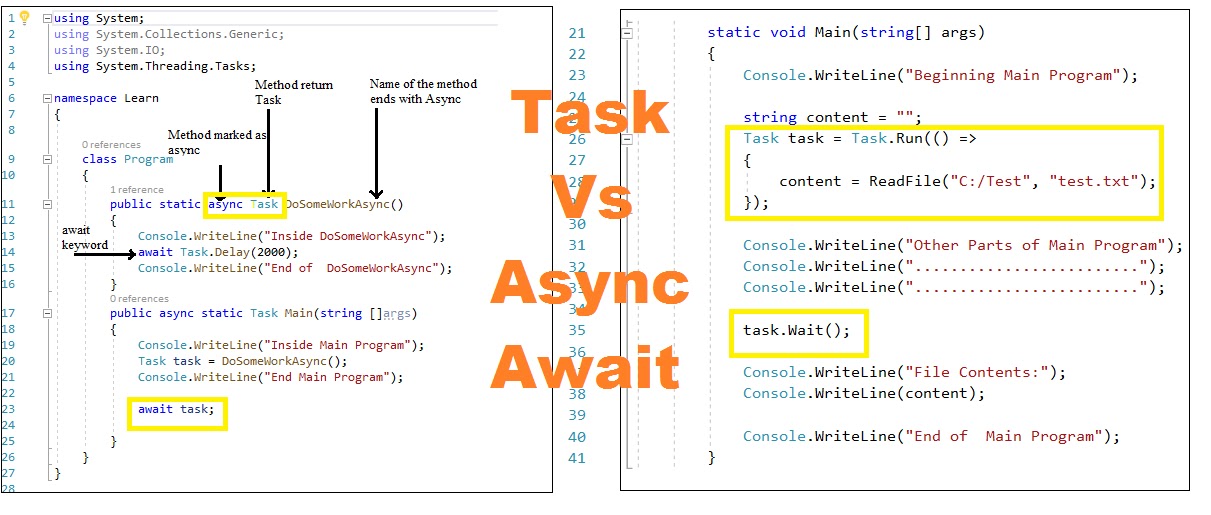
Async Await Non BLocking UI from OLD HTTPWEBREQUEST


Taken from https://stackoverflow.com/questions/14577346/converting-ordinary-http-post-web-request-with-async-and-await

from answer https://stackoverflow.com/a/14711326 

There 4 await, even StreamReader WILL BLOCK your UI ( Gw baru tahu disini, ketika koneksi DOWN and SLOW . Internet Provider in village is sucks ) & GetRequestStreamAsync is must


public async Task GetEnvironmentVariablesAsync(Action<Credentials> getResultCallback, Action<Exception> getErrorCallback)
{
    CredentialsCallback = getResultCallback;
    ErrorCallback = getErrorCallback;
    var uri = new Uri(BaseUri);
    var request = (HttpWebRequest) WebRequest.Create(uri);
    request.Method = "POST";
    request.ContentType = "application/json";
    var jsonObject = new JObject
    {
        new JProperty("apiKey",_api),
        new JProperty("affiliateId",_affid),
    };
    var serializedResult = JsonConvert.SerializeObject(jsonObject);
    byte[] requestBody = Encoding.UTF8.GetBytes(serializedResult);

    // ASYNC: using awaitable wrapper to get request stream
    using (var postStream = await request.GetRequestStreamAsync())
    {
        // Write to the request stream.
        // ASYNC: writing to the POST stream can be slow
        await postStream.WriteAsync(requestBody, 0, requestBody.Length);
    }

    try
    {
        // ASYNC: using awaitable wrapper to get response
        var response = (HttpWebResponse) await request.GetResponseAsync();
        if (response != null)
        {
            var reader = new StreamReader(response.GetResponseStream());
            // ASYNC: using StreamReader's async method to read to end, in case
            // the stream i slarge.
            string responseString = await reader.ReadToEndAsync();
            Credentails = JsonConvert.DeserializeObject<Credentials>(responseString);
            if (Credentails != null && string.IsNullOrEmpty(Credentails.Err))
                CredentialsCallback(Credentails);
            else
            {
                if (Credentails != null)
                    ErrorCallback(new Exception(string.Format("Error Code : {0}", StorageCredentails.Err)));
            }
        }
    }
    catch (WebException we)
    {
        var reader = new StreamReader(we.Response.GetResponseStream());
        string responseString = reader.ReadToEnd();
        Debug.WriteLine(responseString);
        ErrorCallback(we);

    }
}


This is MY OWN IMPLEMENTATION


private async Task<string> REQUESTBLOCK( string blogid, string bearer)
{

string responseresult = string.Empty;

try
{


 HttpWebRequest request = (HttpWebRequest)WebRequest.Create("https:/website/");

 request.UserAgent = "Mozilla/5.0 (Windows NT 6.1; Win64; x64; rv:74.0) Gecko/20100101 Firefox/74.0";
 request.Accept = "*/*";
 request.Headers.Set(HttpRequestHeader.AcceptLanguage, "en-US,en;q=0.5");
 request.Headers.Set(HttpRequestHeader.AcceptEncoding, "gzip, deflate, br");
 request.Referer = "https:/website/" + blogid + "/write/new";
 request.ContentType = "application/json";
 request.Headers.Set(HttpRequestHeader.Authorization, bearer);
 request.Headers.Add("X-Client-Release", @"RELEASE");
 request.Headers.Add("X-Client-Request-Id", @"IDCLIENT");
 request.Headers.Add("Origin", @"https:/website/");
 request.KeepAlive = true;

 request.Method = "POST";
 request.ServicePoint.Expect100Continue = false;


 string body = @"DISINIJSON";
 byte[] postBytes = System.Text.Encoding.UTF8.GetBytes(body);
 request.ContentLength = postBytes.Length;
 Stream stream = await request.GetRequestStreamAsync();
 stream.Write(postBytes, 0, postBytes.Length);
 stream.Close();

 using (var response = await request.GetResponseAsync())
 {
  using (Stream dataStream = response.GetResponseStream())
  {
   // Open the stream using a StreamReader for easy access.  
   StreamReader reader = new StreamReader(dataStream);
   // Read the content.  
   string responseFromServer = await reader.ReadToEndAsync();
   // Display the content.  
   //Console.WriteLine(responseFromServer);

   responseresult = responseFromServer;
   //Console.WriteLine(dataurl);
  }

 }

}  
 catch  /*(WebException e) */
 {

 }

}

Thursday, March 26, 2020

Icon in Application Golang, using rsrc & lxn/walk


Taken from https://stackoverflow.com/questions/25602600/how-do-you-set-the-application-icon-in-golang as my note


You can use a tool like akavel/rsrc in order to generate a .syso file with specified resources embedded in .rsrc section, aimed for consumption by Go linker when building Win32 excecutables.

See as an example the lxn/walk application, which embeds other metadata in its executable.

rsrc [-manifest FILE.exe.manifest] [-ico FILE.ico[,FILE2.ico...]] -o FILE.syso
-ico="":

comma-separated list of paths to .ico files to embed


For more detail in GOLANG APPS from https://github.com/lxn/walk/issues/361#issuecomment-468228063


his only sets the Icon for the console window but not for the Walk GUI window.
To have those also use that same Icon use:

var appIcon, _ = walk.NewIconFromResourceId(3) // number 3 is resource ID printed by RSRC.exe while making accounting.syso

and then add this to each MainWindow or Dialog:

 Icon:     appIcon,

The build would look something like this example (after which the icon also works from in the Visual Studio Code IDE)

cd C:\Build\accounting
C:\Build\Go_tools\rsrc.exe -manifest accounting.manifest -ico accounting.ico -o accounting.syso
go build -ldflags -H=windowsgui

Tuesday, March 24, 2020

Golang UI template NOTE


Golang UI template note.


I use golang framework lxn/walk 

Walk currently requires Go 1.11.x or later.

DEFAULT


test.go

package main

import (
 "github.com/lxn/walk"
 . "github.com/lxn/walk/declarative"
 "strings"
)

func main() {
 var inTE, outTE *walk.TextEdit

 MainWindow{
  Title:   "SCREAMO",
  MinSize: Size{600, 400},
  Layout:  VBox{},
  Children: []Widget{
   HSplitter{
    Children: []Widget{
     TextEdit{AssignTo: &inTE},
     TextEdit{AssignTo: &outTE, ReadOnly: true},
    },
   },
   PushButton{
    Text: "SCREAM",
    OnClicked: func() {
     outTE.SetText(strings.ToUpper(inTE.Text()))
    },
   },
  },
 }.Run()
}
Create Manifest test.manifest 

<?xml version="1.0" encoding="UTF-8" standalone="yes"?>
<assembly manifestversion="1.0" xmlns="urn:schemas-microsoft-com:asm.v1">
<assemblyidentity name="SomeFunkyNameHere" processorarchitecture="*" type="win32" version="1.0.0.0">
    <dependency>
        <dependentassembly>
            <assemblyidentity language="*" name="Microsoft.Windows.Common-Controls" processorarchitecture="*" publickeytoken="6595b64144ccf1df" type="win32" version="6.0.0.0">
        </assemblyidentity></dependentassembly>
    </dependency>
    <application xmlns="urn:schemas-microsoft-com:asm.v3">
        <windowssettings>
            <dpiawareness xmlns="http://schemas.microsoft.com/SMI/2016/WindowsSettings">PerMonitorV2, PerMonitor</dpiawareness>
            <dpiaware xmlns="http://schemas.microsoft.com/SMI/2005/WindowsSettings">True</dpiaware>
        </windowssettings>
    </application>
</assemblyidentity></assembly>
Then either compile the manifest using the rsrc tool, like this:
go get github.com/akavel/rsrc
rsrc -manifest test.manifest -o rsrc.syso
or rename the test.manifest file to test.exe.manifest and distribute it with the application instead.


MY OWN MODIFIED Dialog 


package main

import (
 "log"

 "github.com/lxn/walk"
 . "github.com/lxn/walk/declarative"
)

func main() {
 var dlg *walk.Dialog
 var acceptPB, cancelPB *walk.PushButton

 Dialog{
  Title:         "Scremo",
  DefaultButton: &acceptPB,
  CancelButton:  &cancelPB,
  MinSize:       Size{300, 300},
  Layout:        VBox{},
  Children: []Widget{
   Composite{
    Layout: Grid{Columns: 2},
    Children: []Widget{
     Label{
      Text: "Name:",
     },
     LineEdit{
      Text: Bind("Name"),
     },

     Label{
      Text: "Arrival Date:",
     },
     DateEdit{
      Date: Bind("ArrivalDate"),
     },

     Label{
      Text: "Species:",
     },
     ComboBox{
      Value:         Bind("SpeciesId", SelRequired{}),
      BindingMember: "Id",
      DisplayMember: "Name",
      //Model:         KnownSpecies(),
     },

     Label{
      Text: "Speed:",
     },
     Slider{
      Value: Bind("Speed"),
     },

     RadioButtonGroupBox{
      ColumnSpan: 2,
      Title:      "Sex",
      Layout:     HBox{},
      DataMember: "Sex",
      Buttons: []RadioButton{
       RadioButton{
        Name:  "aRB",
        Text:  "A",
        Value: "a",
       },
       RadioButton{
        Name:  "bRB",
        Text:  "B",
        Value: "b",
       },
      },
     },

     Label{
      Text: "Weight:",
     },
     NumberEdit{
      Value:    Bind("Weight", Range{0.01, 9999.99}),
      Suffix:   " kg",
      Decimals: 2,
     },

     Label{
      Text: "Preferred Food:",
     },
     ComboBox{
      Editable: true,
      Value:    Bind("PreferredFood"),
      Model:    []string{"Fruit", "Grass", "Fish", "Meat"},
     },

     Label{
      Text: "Domesticated:",
     },
     CheckBox{
      Checked: Bind("Domesticated"),
     },

     VSpacer{
      ColumnSpan: 2,
      Size:       8,
     },

     Label{
      ColumnSpan: 2,
      Text:       "Remarks:",
     },
     TextEdit{
      ColumnSpan: 2,
      MinSize:    Size{100, 50},
      Text:       Bind("Remarks"),
     },

     Label{
      ColumnSpan: 2,
      Text:       "Patience:",
     },
     LineEdit{
      ColumnSpan: 2,
      Text:       Bind("PatienceField"),
     },
    },
   },
   Composite{
    Layout: HBox{},
    Children: []Widget{
     HSpacer{},
     PushButton{
      AssignTo: &acceptPB,
      Text:     "OK",
      OnClicked: func() {
       dlg.Accept()
      },
     },
     PushButton{
      AssignTo:  &cancelPB,
      Text:      "Cancel",
      OnClicked: func() { dlg.Cancel() },
     },
    },
   },
  },
 }.Run(nil)
}

func RunAnimalDialog(owner walk.Form) (int, error) {
 var dlg *walk.Dialog
 var db *walk.DataBinder
 var acceptPB, cancelPB *walk.PushButton

 return Dialog{
  AssignTo:      &dlg,
  Title:         Bind("'Animal Details' + (animal.Name == '' ? '' : ' - ' + animal.Name)"),
  DefaultButton: &acceptPB,
  CancelButton:  &cancelPB,
  DataBinder: DataBinder{
   AssignTo: &db,
   Name:     "animal",
   //DataSource:     animal,
   ErrorPresenter: ToolTipErrorPresenter{},
  },
  MinSize: Size{300, 300},
  Layout:  VBox{},
  Children: []Widget{
   Composite{
    Layout: Grid{Columns: 2},
    Children: []Widget{
     Label{
      Text: "Name:",
     },
     LineEdit{
      Text: Bind("Name"),
     },

     Label{
      Text: "Arrival Date:",
     },
     DateEdit{
      Date: Bind("ArrivalDate"),
     },

     Label{
      Text: "Species:",
     },
     ComboBox{
      Value:         Bind("SpeciesId", SelRequired{}),
      BindingMember: "Id",
      DisplayMember: "Name",
      //Model:         KnownSpecies(),
     },

     Label{
      Text: "Speed:",
     },
     Slider{
      Value: Bind("Speed"),
     },

     RadioButtonGroupBox{
      ColumnSpan: 2,
      Title:      "Sex",
      Layout:     HBox{},
      DataMember: "Sex",
      Buttons: []RadioButton{
       RadioButton{
        Name:  "aRB",
        Text:  "A",
        Value: "a",
       },
       RadioButton{
        Name:  "bRB",
        Text:  "B",
        Value: "b",
       },
      },
     },

     Label{
      Text: "Weight:",
     },
     NumberEdit{
      Value:    Bind("Weight", Range{0.01, 9999.99}),
      Suffix:   " kg",
      Decimals: 2,
     },

     Label{
      Text: "Preferred Food:",
     },
     ComboBox{
      Editable: true,
      Value:    Bind("PreferredFood"),
      Model:    []string{"Fruit", "Grass", "Fish", "Meat"},
     },

     Label{
      Text: "Domesticated:",
     },
     CheckBox{
      Checked: Bind("Domesticated"),
     },

     VSpacer{
      ColumnSpan: 2,
      Size:       8,
     },

     Label{
      ColumnSpan: 2,
      Text:       "Remarks:",
     },
     TextEdit{
      ColumnSpan: 2,
      MinSize:    Size{100, 50},
      Text:       Bind("Remarks"),
     },

     Label{
      ColumnSpan: 2,
      Text:       "Patience:",
     },
     LineEdit{
      ColumnSpan: 2,
      Text:       Bind("PatienceField"),
     },
    },
   },
   Composite{
    Layout: HBox{},
    Children: []Widget{
     HSpacer{},
     PushButton{
      AssignTo: &acceptPB,
      Text:     "OK",
      OnClicked: func() {
       if err := db.Submit(); err != nil {
        log.Print(err)
        return
       }

       dlg.Accept()
      },
     },
     PushButton{
      AssignTo:  &cancelPB,
      Text:      "Cancel",
      OnClicked: func() { dlg.Cancel() },
     },
    },
   },
  },
 }.Run(owner)
}

Saturday, March 21, 2020

C# and NLUA for plugins

C# and NLUA, For my note ONLY


di class C#


--// Ini di class c#
-- SomeClass obj = new SomeClass ("Param");
-- state ["obj"] = obj; // Create a global value 'obj' of .NET type SomeClass


Di NLUA nya


--// Disini starting NLUA scriptnya


local res1 = obj:Text()
obj:MessageBoxing(res1)

local res3 = obj:DownloadStringText('http://nlua.org')
-- obj:MessageBoxing(res3)

Paint the form via LUA ( di gambar dulu biar popout lebih native c# daripada sekedar MessageBox.


NLUA

-- //////////////////////////=====================

-- kevinh - the following lines are part of our standard init
-- require("compat-5.1")

import("System.Windows.Forms")
import("System.Drawing, Version=4.0.0.0, Culture=neutral, PublicKeyToken=b03f5f7f11d50a3a")
import("System.Drawing")


local EnumToObject, WinFormsAnchorStylesType =
                luanet.get_method_bysig(luanet.System.Enum, "ToObject",
                                             "System.Type", "System.Int32"),
                luanet.System.Windows.Forms.AnchorStyles.Top:GetType()

AnchorTop, AnchorLeft, AnchorRight, AnchorBottom = 1, 4, 8, 2

function Anchor(flags)
  return EnumToObject(WinFormsAnchorStylesType, flags)
end


form1=Form()
button1=Button()
richtext1=RichTextBox()
button2=Button()

function handleClick(sender,data)
  if sender.Text=="OK" then
    sender.Text="Clicked"
  else
    sender.Text="OK"
  end
  button1.MouseUp:Remove(handler)
  MessageBox.Show (sender:ToString())
end


button1.Text = "OK"
button1.Location=Point(10,10)
button2.Text = "Cancel"
button2.Location=Point(button1.Left, button1.Height + button1.Top + 10)
richtext1.Location = Point(button2.Left,button2.Height + button2.Top + 10)
richtext1.Size = Size(form1.Width-30, form1.Height - 120)
richtext1.Text = res3
richtext1.Anchor = Anchor(AnchorLeft + AnchorTop + AnchorRight + AnchorBottom)


handler=button1.MouseUp:Add(handleClick)
form1.Text = "My Dialog Box"
form1.HelpButton = true
form1.MaximizeBox=false
form1.MinimizeBox=false
form1.AcceptButton = button1
form1.CancelButton = button2
form1.Controls:Add(button1)
form1.Controls:Add(button2)
form1.Controls:Add(richtext1)
form1:ShowDialog()


FULL Scriptnya


--// Ini di class c#
-- SomeClass obj = new SomeClass ("Param");
-- state ["obj"] = obj; // Create a global value 'obj' of .NET type SomeClass 

--// Disini starting NLUA scriptnya


local res1 = obj:Text()
obj:MessageBoxing(res1) 

local res3 = obj:DownloadStringText('http://nlua.org')
-- obj:MessageBoxing(res3) 

-- //////////////////////////=====================

-- kevinh - the following lines are part of our standard init
-- require("compat-5.1")

import("System.Windows.Forms")
import("System.Drawing, Version=4.0.0.0, Culture=neutral, PublicKeyToken=b03f5f7f11d50a3a")
import("System.Drawing")


local EnumToObject, WinFormsAnchorStylesType = 
                luanet.get_method_bysig(luanet.System.Enum, "ToObject",
                                             "System.Type", "System.Int32"),
                luanet.System.Windows.Forms.AnchorStyles.Top:GetType()

AnchorTop, AnchorLeft, AnchorRight, AnchorBottom = 1, 4, 8, 2

function Anchor(flags)
  return EnumToObject(WinFormsAnchorStylesType, flags)
end


form1=Form()
button1=Button()
richtext1=RichTextBox()
button2=Button()

function handleClick(sender,data)
  if sender.Text=="OK" then
    sender.Text="Clicked"
  else
    sender.Text="OK"
  end
  button1.MouseUp:Remove(handler)
  MessageBox.Show (sender:ToString())
end


button1.Text = "OK"
button1.Location=Point(10,10)
button2.Text = "Cancel"
button2.Location=Point(button1.Left, button1.Height + button1.Top + 10)
richtext1.Location = Point(button2.Left,button2.Height + button2.Top + 10)
richtext1.Size = Size(form1.Width-30, form1.Height - 120)
richtext1.Text = res3
richtext1.Anchor = Anchor(AnchorLeft + AnchorTop + AnchorRight + AnchorBottom)


handler=button1.MouseUp:Add(handleClick)
form1.Text = "My Dialog Box"
form1.HelpButton = true
form1.MaximizeBox=false
form1.MinimizeBox=false
form1.AcceptButton = button1
form1.CancelButton = button2
form1.Controls:Add(button1)
form1.Controls:Add(button2)
form1.Controls:Add(richtext1)
form1:ShowDialog()

Saturday, March 14, 2020

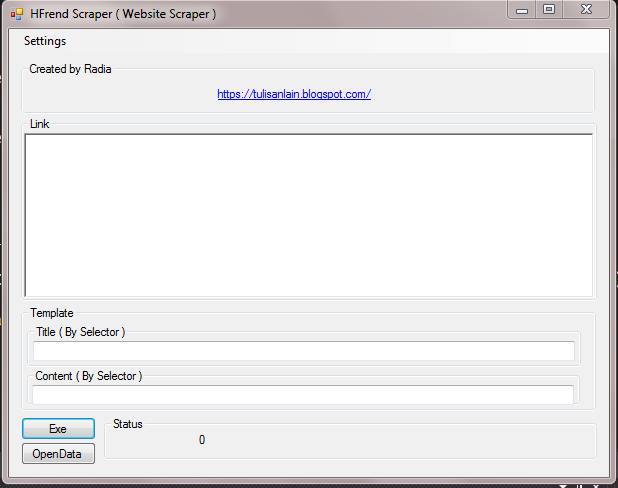
HFrendScraper ( Website Scraper )

Sebenarnya HFrendScraper ( Website Scraper ) , adalah lanjutan dari Html scraper ( Website Content Scraper ) with CSS3 selector ( Jquery selector style ) yang sudah mati.

HFrendScraper Mendukung technology CSS3 selector. jadi scraping cuma yang di butuhkan saja.


Join and ask in our FB GROUP


SCREENSHOT


Feature:

-Data di simpan dalam bentuk txt.
- Perlu NET 4.6.1

TUTORIAL

Hfrend Scraper Dasar


Hasil dari HFREND Scraper ke BLOG  


Contoh Kasus, Scraping Goodread 

  Contoh Kasus , Scraping Blogspot


DOWNLOAD

Versi 1.0
DOWNLOAD


 Versi 1.1

Feature: 

  • Template hasil scrape
  • remove tag html agar lebih bersih

Video:


DOWNLOAD

v1.2


Feature:

- Multiple css selector on title and content ( if null will try next one ).  Separated with  | ( Pipe or vertical bar )

https://www.mediafire.com/file/cwxb3qgc7r5qvvt/Hfrend_v1.2.zip/file


Thursday, February 6, 2020

Scraper MOVIE AND TV, from TMDB , Scraper TMDB #scaper


This is Scraper TMDB movie and TV, But for now this is scraper only for movie. TMDB is like IMDB alternatif sites, but build by community and for community.

TMDB is
The Movie Database (TMDb) is a community built movie and TV database. Every piece of data has been added by our amazing community dating back to 2008. TMDb's strong international focus and breadth of data is largely unmatched and something we're incredibly proud of. Put simply, we live and breathe community and that's precisely what makes us different.

In this Scraper TMDB you get data as : MOVIE ID (TMDB ID), LINK OF MOVIE, TITLE, OVERVIEW, IMAGE PATH (POSTER) of MOVIE

The Result is on CSV files. And I enforcing limit about 30 seconds until 60 seconds.

Join and ask in our FB GROUP

SCREENSHOT


SCRAPER TMDB v1.0

https://www.mediafire.com/file/wb6faapdrxrqpev/Scraper_TMDB_v1.0.zip/file

https://www.mediafire.com/file/wb6faapdrxrqpev/Scraper_TMDB_v1.0.zip/file

Scraper GoodReads, Ebook Scraper


Scraper GoodReads, Ebook Scraper, result come with 3 different data, ID, LINK, TITLE.

GOODREADS:
Goodreads is the world’s largest site for readers and book recommendations. Our mission is to help people find and share books they love. Goodreads launched in January 2007. 

Btw the scraper will randomly delay between 5 second to 30 seconds.

Btw dont forget to join us in our FB GROUPS


ScreenSHOT


Requirement 

NET 4.6.1 and atleast WINDOWS 7

 Scraper GoodReads v1.1

https://www.mediafire.com/file/hhroeqayz2dzzsd/Scraper_GoodReads_v1.0.zip/file

Thursday, December 12, 2019

Fira Code Font in NOTEPAD++ , Sublime3 and VSCODE

Fira Code: monospaced font with programming ligatures


Fira Code: monospaced font with programming ligatures


 =================== SUBLIME =================


Installing

Make sure you install the font.


Enabling

Preferences --> Settings
Add before "ignored_packages":
"font_face": "Fira Code",
"font_options":
[
 "subpixel_antialias"
],

Antialias

If you want enable antialias, add in font_options: "gray_antialias"


 =================== NOTEPAD++ =================


It won't currently work "out of the box". The text rendering needs tweaked but you can do it with a plugin. Keep in mind support for ligatures is not officially supported so you might run into issues.
This is the easiest way I know (without recompiling) to get ligatures to work in Notepad++:
  1. Install a recent version of Fira Code (use either the normal font or the retina as those are the only ones that seem to work).
  2. Install LuaScript via the Plugin Manager (you can also use PythonScript if you are more comfortable with it or want to use a 10 ton hammer).
  3. Select the font via Settings > Style Configurator > Global Styles > Global Override. Select "Fira Code" for the font style and turn on Enable global font
  4. Edit the LuaScript startup file by doing Plugins > LuaScript > Edit Startup Script and add the following code:
editor1.Technology = SC_TECHNOLOGY_DIRECTWRITE
editor2.Technology = SC_TECHNOLOGY_DIRECTWRITE
Restart and enjoy.


 =================== VS CODE =================


Requirements

Make sure you install the font.

Using the Settings Editor

To open the settings editor, first from the File menu choose Preferences, Settings or use keyboard shortcut Ctrl+, (Cmd+, on Mac).
To enable FiraCode in the settings editor, under "Commonly Used", expand the "Text Editor" settings and then click on "Font". In the "Font Family" input box type Fira Code, replacing any content. Tick the check box "Enables/Disables font ligatures" under "Font Ligatures" to enable the special ligatures.

Manually editing settings.json

Visual Studio Code allows you to also edit the underlying settings.json config file. First open the settings editor as described above, then click the "curly brackets" icon to open the "settings.json" file.
Then paste the following lines and save the file.
"editor.fontFamily": "Fira Code",
"editor.fontLigatures": true,
If this doesn't work for you, you can try:
  1. restarting VS Code;
  2. wrapping the "Fira Code" section with additional apostrophes:
    "editor.fontFamily": "'Fira Code'",
    "editor.fontLigatures": true,

Font weights

To achieve different weights add one of the following (verified on Mac):
    "editor.fontWeight": "300" // Light
    "editor.fontWeight": "400" // Regular
    "editor.fontWeight": "500" // Medium
    "editor.fontWeight": "600" // Bold
To use Retina weight, change Font name to FiraCode-Retina if macOS (exactly that, no spaces):
    "editor.fontFamily": "FiraCode-Retina",
or 'Fira Code Retina' if Windows or Linux:
    "editor.fontFamily": "Fira Code Retina",